Company Disclosure Monitor: The Magnificent Seven
日本語で読むA bilingual SEC filing monitor for seven US companies. Trace quarterly earnings to their sources, investigate discrepancies in Excel, and read reviewed filing highlights.
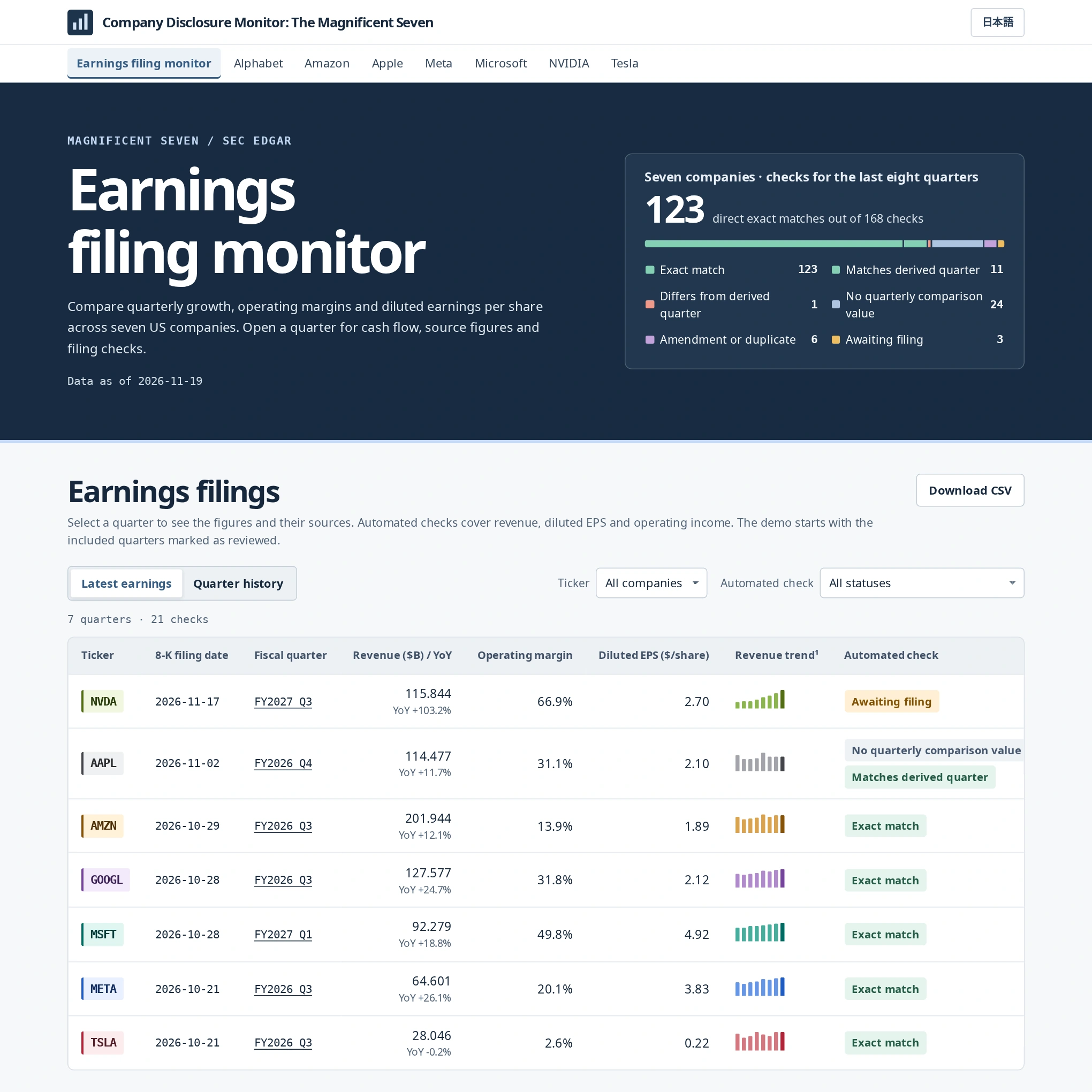
From a reported figure to its source
An earnings release may give a three-month figure while the annual report gives a twelve-month total. I built this monitor to show which figures a reader can reproduce from the company’s SEC filings. For each comparison, the reader can inspect the amounts, their reporting periods and the source documents, even when the check remains open.
The November 19, 2026 edition covered 56 fiscal quarters across Alphabet, Amazon, Apple, Meta, Microsoft, NVIDIA and Tesla. Python checks financial figures against the filings. For narrative disclosures, a local Qwen model drafts Japanese descriptions of events and identifies the English paragraphs a reviewer needs to check.
Preparing a quarterly company comparison
An analyst updating a comparison sheet can export the latest earnings to CSV. The seven companies have different fiscal calendars, so the analyst can use each company’s quarter-end date to identify the period before comparing results.
A colleague preparing a briefing can use the company workbook to see which figures still need a second source. The colleague can open Items to review, look up the original row and period in Sources and calculations, and follow the link to the SEC document. For a management change mentioned in the briefing, the filing highlights provide the relevant source paragraphs. Download the NVIDIA workbook (Excel)
Reconstructing NVIDIA’s fourth-quarter operating income
NVIDIA reported $44.299 billion in GAAP operating income for FY2026 Q4. Its annual report (Form 10-K) gives the full-year figure. The monitor takes $130.387 billion for the fiscal year, subtracts $86.088 billion for the first nine months from the preceding Form 10-Q, and obtains $44.299 billion. The register labels the result Matches derived quarter. Both inputs remain visible alongside the result. Earnings release · Annual Form 10-K · Nine-month Form 10-Q
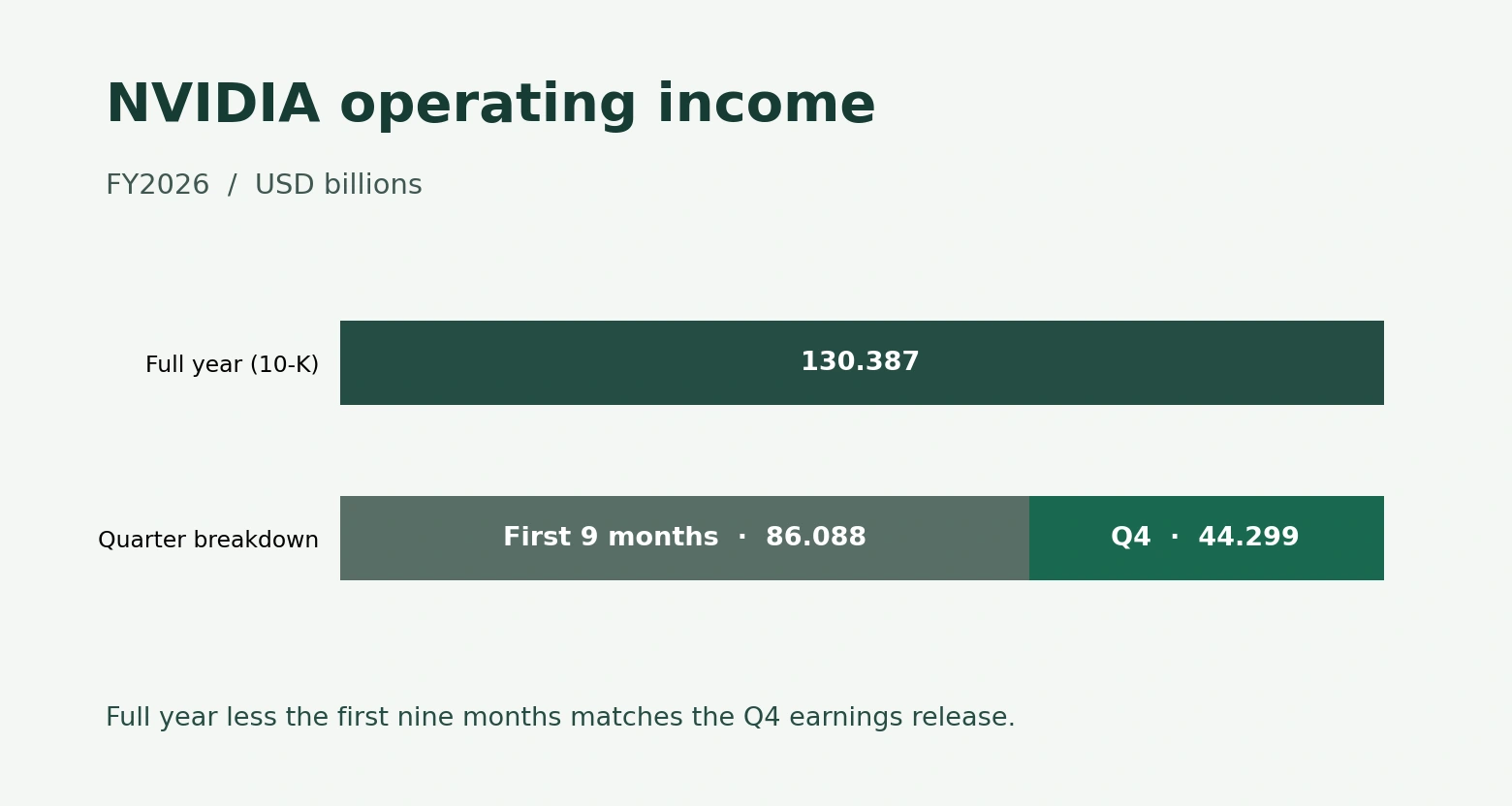
To reproduce the check, open the quarter and choose Operating income under Source table comparison. Then select Diluted EPS. The company reported diluted earnings per share (EPS) of $1.76, but the monitor found no comparable three-month consolidated EPS fact in the periodic report. Each period has its own weighted-average share count, so subtracting nine-month EPS from annual EPS would give an unreliable comparison. The register therefore shows No quarterly comparison value for diluted EPS. Explore NVIDIA FY2026 Q4
How the system fits together
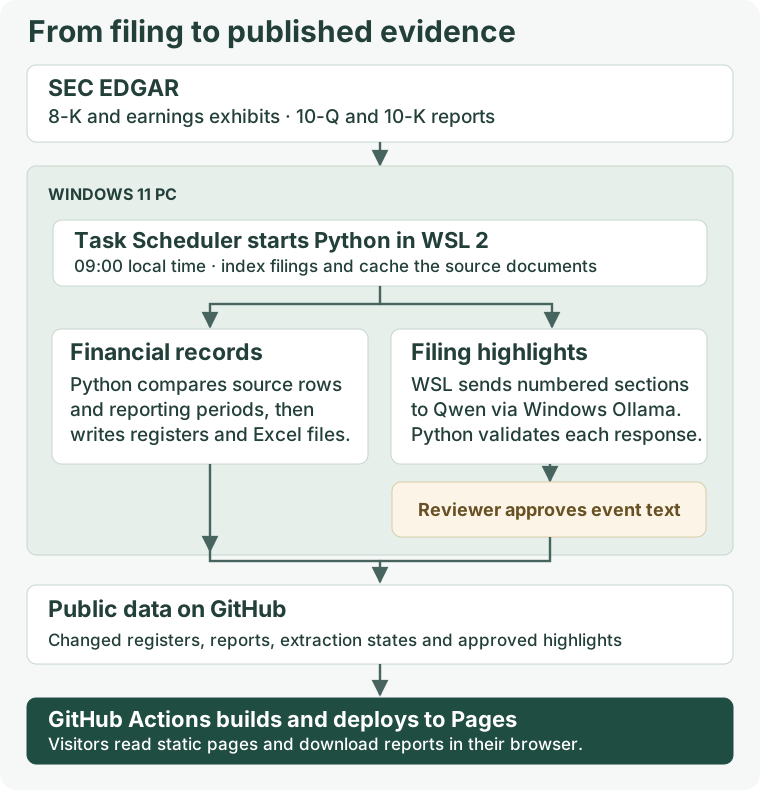
A Windows task starts the Python workflow in WSL 2 at 09:00 local time. It reads filing metadata from SEC EDGAR, caches source documents and queues new 8-K sections. For narrative extraction, the WSL client sends sections with numbered paragraphs to Qwen 27B through Ollama on the same PC.
GitHub receives the public register data, extraction states, approved highlights and Excel reports. GitHub Actions builds the static site, and GitHub Pages serves it. Visitors can read the last published edition even while the processing PC is offline.
Matching an earnings release to a periodic report
The collector identifies the earnings exhibit attached to Form 8-K and pairs it with the issuer’s quarterly Form 10-Q or annual Form 10-K. It uses the accounting period to group the filings. The submission date alone can be misleading: Tesla, for example, can file a delivery update before it releases financial results. The collector checks the exhibit for that case.
For the periodic report, Python reads XBRL facts, which identify a financial concept, unit and reporting context. For example, a filing may tag both three-month and year-to-date amounts as revenue. The register keeps the filing identifier, source row or tag, amount and period so a reviewer can trace each comparison. Amendments, duplicate candidates and conflicting period ends are flagged for inspection.
Reading the register and its eight indicators
The overview shows the latest earnings or quarter history and can be filtered by ticker or check result. Each quarter contributes three checks to the overview, one each for revenue, diluted EPS and operating income. The small revenue charts use a separate scale for each row. To compare companies of different sizes, use the reported amounts. Within a company register, select a metric to see its trend and select a quarter’s row to inspect the sources.
| Indicators | How to interpret them |
|---|---|
| Revenue, diluted EPS and operating income | These are the three primary comparisons. The register displays the issuer’s GAAP figures and the available periodic-report comparison, with units and fiscal period. |
| Revenue growth and operating margin | Growth compares revenue with the same fiscal quarter a year earlier. Margin divides operating income by revenue. Each calculation uses inputs from the same disclosure. A missing input or a zero denominator leaves the ratio unavailable. |
| Operating cash flow and capital expenditures | The source view identifies whether a quarterly amount was disclosed directly or derived from cumulative figures. Capital expenditure is shown as positive spending, with issuer-specific scope. NVIDIA’s measure includes purchases of intangible assets. |
| Free cash flow | The monitor subtracts capital expenditure from operating cash flow. It requires both figures from the earnings release or both from the periodic report. |
Following an exception into Excel
The overview exports its current selection to CSV. A company register also offers a row-level CSV and an Excel workbook in either language. Its three sheets connect the reported figures to the evidence behind each check.
- Quarterly trends shows periods side by side, with formulas linked to supporting values. Dollar amounts are in millions, EPS is in dollars per share, and ratios are percentages.
- Sources and calculations lists the original amount, row label, period and SEC link. A cumulative difference occupies two source rows, as in the NVIDIA example.
- Items to review lists unresolved comparisons and applicable cash-flow differences. When both values are available, the difference is the release amount less the periodic-report amount.
The automated check applies to one metric. A formal review decision applies to a whole quarter and a specific version of its evidence. The demo initially displays Reviewed for the included quarters, and a visitor can try changing the badge until the page reloads. The CSV exports the official review state. The Excel exception list follows the automated checks, so a quarter marked Reviewed can still contain an unresolved comparison.
From an 8-K paragraph to a published highlight
The extractor splits the body of a Form 8-K at recognized Item headings and divides long sections at paragraph boundaries. It skips Item 9.01, which generally lists exhibits. The earnings tables in the attached release are handled by the financial pipeline.
Qwen proposes a Japanese description of an event and returns structured fields for the subject, dates, status and conditions, with references to numbered English paragraphs. Python checks the response structure and the paragraph references. Apple’s November 2026 filing illustrates why the dates matter. The underwriting agreement was dated November 5, and Apple reported completing the issuance and sale of the notes on November 9. A reviewer can check both dates against the cited paragraph before approving the section. Approval applies to that section and source version. Other sections in the same filing can remain open. Apple’s published highlight · Original Form 8-K
Why run Qwen locally?
I run Qwen 27B through Ollama on my workstation so I can test a revised extraction prompt on the same filing paragraphs without paying a model API fee for each run. The filings are public, and I keep draft responses and the review queue on the workstation. This uses local computing power and electricity. When the PC is off, new highlights wait until processing resumes.
Results from the initial 78 filings
The initial backfill covered 78 filings and included previously saved NVIDIA results. It yielded 27 candidate events. Ten candidates described directors elected at the same shareholder meeting; the published edition grouped them into one highlight. The result was 18 published highlights across 14 filings.
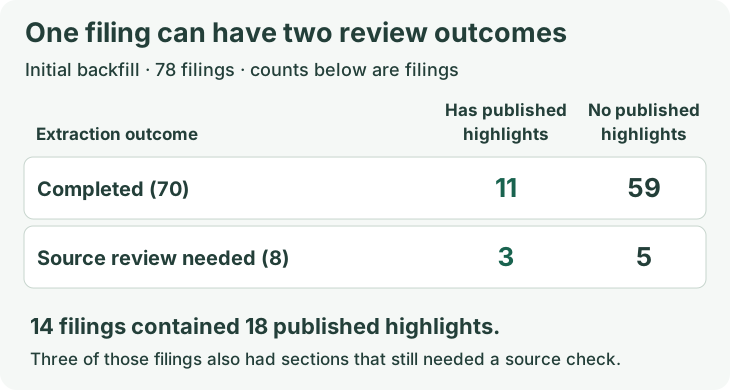
Of the eight filings flagged for source review, three already had a published highlight from another section. For 59 filings, extraction finished with zero candidates. These are workflow outcomes. To estimate how often the model misses an event, a reviewer would need to label the source filings independently and compare those labels with the model’s output.
Daily publication and recovery
The daily job saves the filing queue before advancing its record of the last check. It reuses cached SEC documents and regenerates workbooks for companies whose financial data changed. For Qwen, it keys saved runs by issuer, filing, source version, section and request fingerprint. A retry can reuse a validated response to the same request.
When public inputs change, the publisher applies them to a temporary checkout of the repository’s main branch and builds the site there. The build checks the company list, quarter ordering and workbook hashes. The publisher pushes the changed public files and waits for the Pages workflow to finish. The first automatic publication completed successfully. Deployment record
| Operating condition | What the workflow does |
|---|---|
| The PC is off at the scheduled time | Windows is configured to start the task when available. The saved queue and filing index let a later run pick up outstanding work. |
| Ollama is unavailable | The workflow records the model error and retains the extraction work. Changes to the financial registers and reports can still be published. |
| Public inputs are unchanged | If no deployment is pending, the publisher skips the push and deployment. |
| The same file has a conflicting edit on GitHub | The publisher stops for reconciliation. If an earlier push succeeded but deployment was interrupted, a saved checkpoint lets it resume without waiting for a new filing. |
Source code Financial reconciliation · Local event extraction · Excel generation · Publication and recovery
Tools & Technologies
Python · SEC EDGAR · XBRL · Ollama · Qwen 27B · XlsxWriter · WSL 2 · GitHub Actions