Google Arts & Culture Image Collection Pipeline
A Python workflow developed in 2020 to collect artwork images and prepare a dataset for an art and museum recommendation application.
Overview
In August 2020, I developed a Python workflow to collect artwork images and information from Google Arts & Culture and prepare a local dataset for an art and museum recommendation application. The work was undertaken for Recommend Art Museum, developed in October 2020.
The project combines webpage navigation, image downloading, dataset preparation, and similarity-based image screening. It is an archived, partly interactive workflow rather than a fully automated application.
My Contributions
- Built a Selenium script to discover cultural institution partner pages.
- Wrote Scrapy Shell scripts to extract artwork page links, download referenced images, and collect page text.
- Implemented image consolidation, JPEG conversion, cropping, resizing, and CSV export in Jupyter notebooks.
- Developed correlation-based image screening and procedures to renumber images while updating their associated metadata.
Workflow
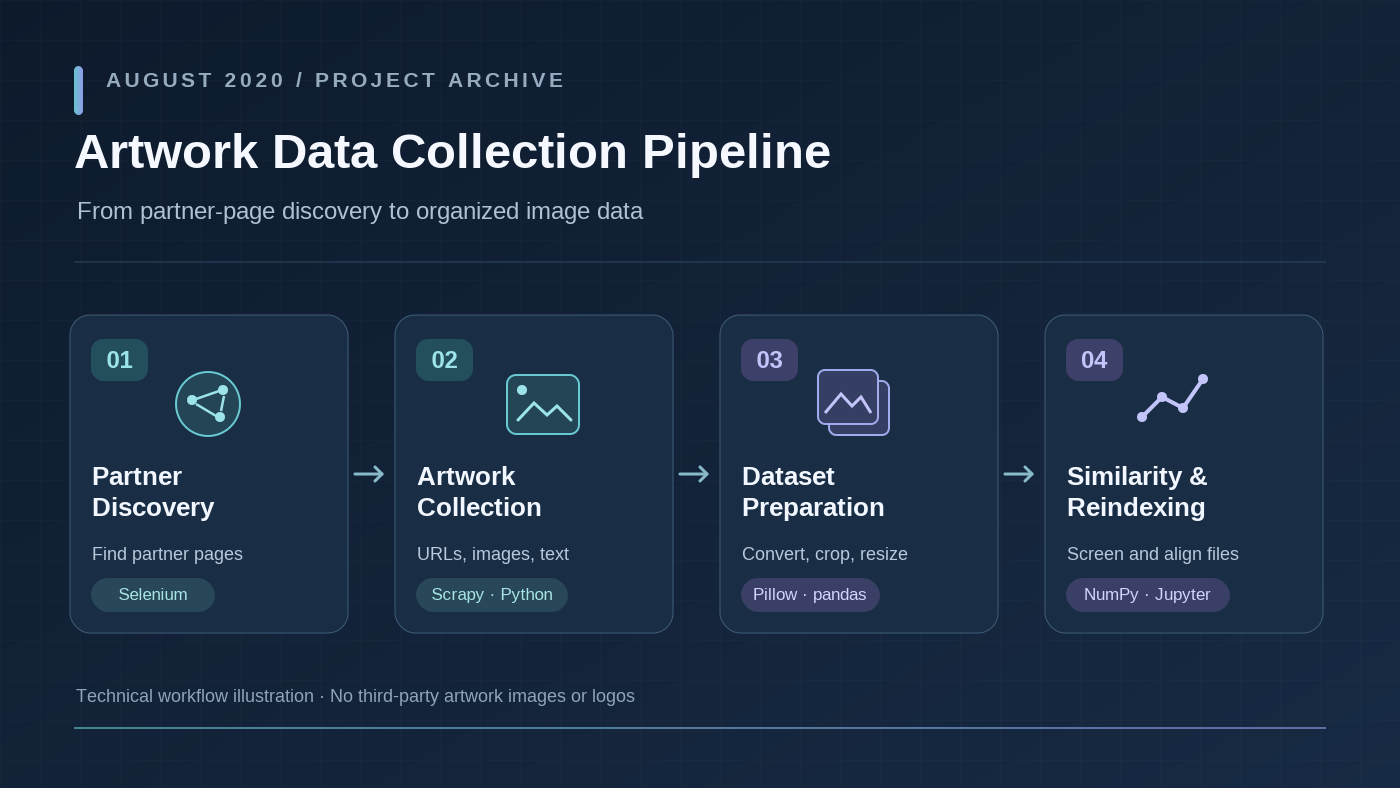
1. Partner Discovery
A Selenium script navigates the Google Arts & Culture partner directory, scrolls through the page, and exports discovered partner URLs to all_partner.csv.
2. Artwork Collection
Scrapy Shell scripts extract artwork page links from partner pages, then download image files and save selected page text in partner-specific directories. The image extraction uses the first HTML img element and does not verify that it is the primary artwork image.
3. Dataset Preparation
CreateDataset.ipynb consolidates the downloaded files, converts images to RGB JPEG format, and exports details.csv. This file contains partner identifiers, partner URLs, and extracted text rather than a normalized catalog of artwork metadata.
The notebook also implements center-cropping for images with an aspect ratio greater than 1.2 and resizing to 224 × 224 pixels. The preserved notebook does not confirm successful execution of that preprocessing step.
4. Similarity Screening and Reindexing
CheckImages.ipynb represents images as grayscale pixel vectors and uses Pearson correlation to flag image pairs with a coefficient greater than 0.85. It also contains code to remove selected image files. RenameImagesDetails.ipynb subsequently renumbers remaining JPEGs and rebuilds the corresponding metadata CSV.
Results and Verification
The original Git history preserves notebook output identifying 132 image pairs above the correlation threshold of 0.85. These are similarity candidates, not 132 verified duplicates. The number of files successfully removed was not recorded.
Notebook execution records indicate that image consolidation, CSV export, and reindexing cells were run. However, the repository does not independently establish the final dataset size, complete collection success rate, or successful end-to-end execution.
Limitations
- The scripts rely on website-specific selectors and library versions from 2020; compatibility with the current website has not been tested.
- Some stages require an interactive Scrapy Shell session; there is no single command for the entire workflow.
- Image selection, download failures, and dataset completeness were not systematically validated.
- The repository does not establish a record-by-record correspondence between the collected data and the later recommendation application’s dataset.
Data Availability
Collected artwork images and metadata datasets are not distributed in the repository or displayed on this page. The illustration is an original workflow diagram, not a collection of artwork images.
Third-party content remains subject to applicable rights and usage conditions. This independent project is not affiliated with or endorsed by Google.
Related Project
Recommend Art Museum (October 2020) — the artwork and museum recommendation application that motivated this data collection and preparation work.
Tools & Technologies
Python · Selenium · Scrapy · pandas · NumPy · Pillow · Jupyter Notebook · Conda