Local LLM Inference on AMD Ryzen AI Max
A self-hosted LLM environment built on AMD Ryzen AI Max+ 395 for research use, with similar systems deployed to two laboratories.
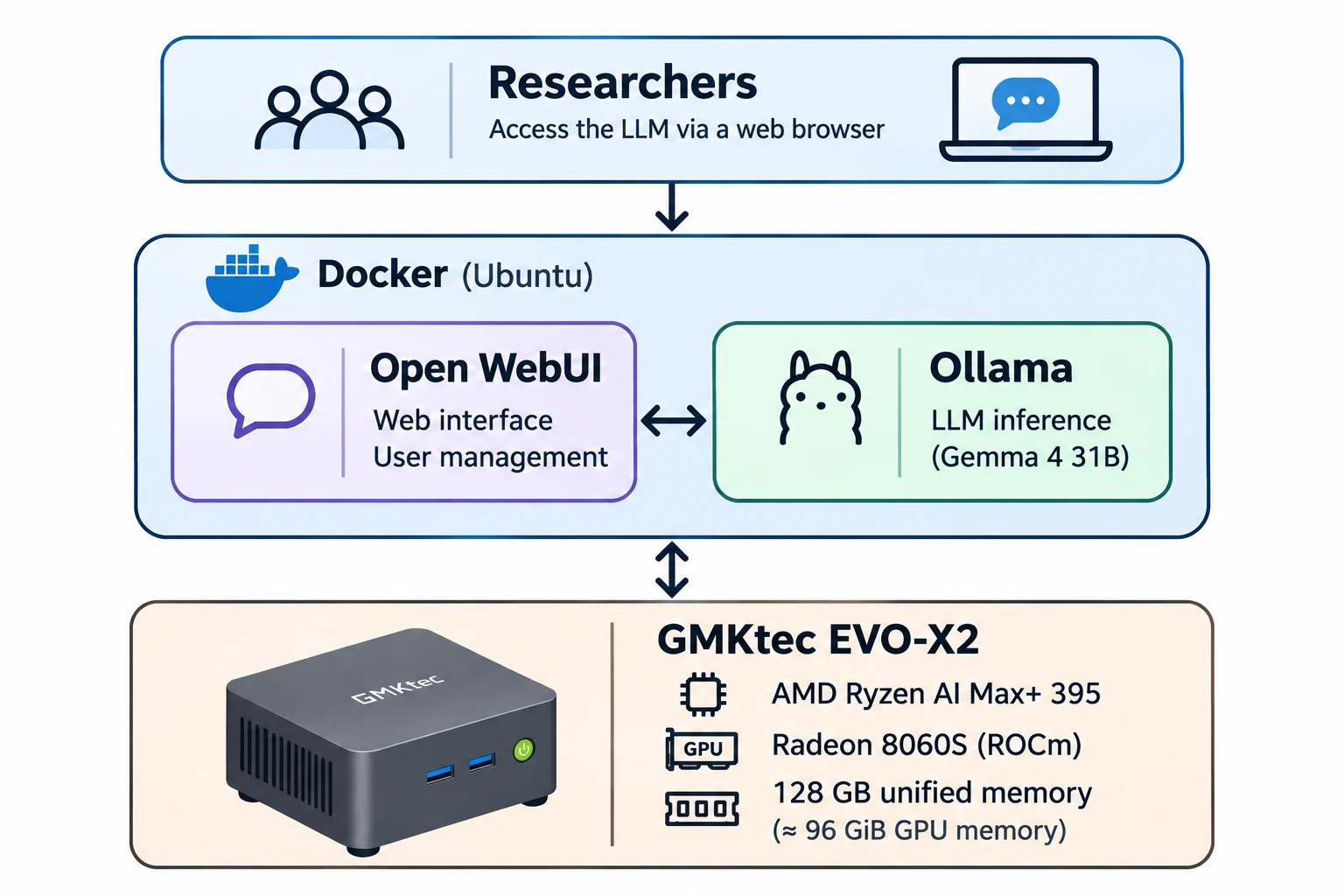
Overview
I built a local large language model (LLM) environment on a GMKtec EVO-X2 with an AMD Ryzen AI Max+ 395 processor and Radeon 8060S integrated GPU. The system lets researchers use locally hosted language models through a web browser without installing inference software on their own computers.
I also deployed similar environments to two research laboratories.
System Architecture
The EVO-X2 has 128 GB of unified memory, with 96 GiB reported as GPU memory in my configuration. The GPU and CPU share physical memory rather than using dedicated graphics memory.
I configured Ubuntu and AMD ROCm for GPU acceleration and used Docker Compose to run Ollama and Open WebUI in separate containers. Ollama serves the models, while Open WebUI provides the browser interface and user management.
Implementation
The environment currently uses Gemma 4 31B with Q4_K_M quantization. I configured Open WebUI for research-oriented tasks, including long-document workflows, model settings, and account administration.
To keep the intended workflow focused on local inference, I disabled Web Search and unnecessary external integrations in Open WebUI. Local model execution alone does not guarantee network isolation; access also depends on how the host and its services are configured.
Deployment & Troubleshooting
Deploying and maintaining the environment required attention to ROCm, Ollama, and Linux kernel compatibility. On another EVO-X2, ROCm detected the GPU but Ollama inference failed. Comparing kernel configurations helped restore GPU inference, which I verified through model-layer offloading and successful API responses.
The experience informed how I document and maintain these systems for research use.
Technical Articles
I documented the setup and related technical work in a three-part DEV.to series:
- Running Ollama on AMD Ryzen AI Max+ 395 with ROCm and Docker — Ubuntu, ROCm, Docker, and GPU inference setup.
- Configuring Gemma 4 31B and Open WebUI for a Research Laboratory — Model configuration, access management, and document-oriented use.
- Troubleshooting Ollama GPU Inference Failures on AMD Ryzen AI Max — Diagnosing a kernel-related inference failure.
Tools & Technologies
AMD Ryzen AI Max+ 395 · Radeon 8060S · Ubuntu · ROCm · Docker · Ollama · Open WebUI · Gemma 4 31B